
Time clocks can track employee attendance, but the best time clocks help improve employee attendance. Improving workplace health and safety can greatly reduce how much sick time employees take. You can help your customers get proactive about reducing the likelihood employees will transmit illness among each other by offering them a facial recognition time clock system.
Facial recognition creates a low-contact experience for employees at the time clock. Adding facial recognition to high-function time clocks with the power to operate quickly means fewer employees gathering around the time clock waiting to punch in or out. The combination results in fewer opportunities for employees to share bugs and bacteria that can spread illness.
When you offer customers and prospects biometric face recognition time clocks as part of your employee attendance and workforce management software, what you’re really offering them is a tool that can improve employee productivity by reducing the need for them to use their sick days.
Why Sell ATS’ Facial Recognition Time Clock
Our facial recognition system (FRS) is an add-on compatible with our stride80 time clock.
Together, they provide a solution for your customers who have concerns about time clocks as a potential health risk for their workforce.
We designed the FRS to minimize the need for employees to touch the time clock by allowing the time clock to identify employees by their facial characteristics.
How Facial Recognition Time Clocks Work
Biometric facial recognition technology has been developing over decades. There are a variety of facial recognition technologies today, but they all operate in similar ways.
The facial recognition software scans a person’s face, mapping out the geometry of its features. The collected data is then input into an algorithm and encrypted as a data string.
This encrypted data string is the basis of the template used to compare the live image of the person standing in front of the time clock. The time clock can be set up to verify the employee.
The verification process is a two-step process. Employees identify themselves to the time clock through time cards or other reader options. It selects the biometric facial recognition template for that employee and conducts a time clock comparison to the facial scan taken of the person at the time clock. If the facial recognition software verifies the person is who they say they are, by matching the live facial scan to the selected template, it lets them use the time clock. If the biometric template and live facial scan don’t match, the time clock cannot verify the employee’s identity and they won’t be able to use the time clock. Head on over here for a more detailed explanation of how facial recognition software works.

How an Employee Time Clock with Facial Recognition Can Reduce Sick Days
We’ve all seen how quickly some illnesses can spread through groups of people, whether at school, at work, or just out shopping.
A common vector for spreading germs is the proximity and utilization of shared resources, like an employee time clock or printer.
Since Covid, everyone has a higher sensitivity to shared health risks within groups and new, higher expectations as to what’s required to maintain a safe work environment.
Looking at time clocks, they present two main health risks:
- A constant stream of employees touching the time clock multiple times over to complete a single punch in or out.
- Slow functioning time clocks that can’t process punches quickly create large groups of employees standing in close proximity as they wait to punch in or out.
Poor hygiene practices, whether its employees who don’t wash their hands or maintenance teams that don’t keep device surfaces clean, can exacerbate both these health risks at the time clock.
How Our Facial Recognition Time Clock Reduces Both Risks
The stride80 hardware and FRS software combine to provide layers of defense at the time clock.
Stride80 hardware
The processing power and memory storage in the stride80 keeps the employee line moving at the time clock. The clock quickly handles all aspects of an employee interaction, including the biometric authentication.
The stride80’s speed minimizes the wait time and risk of employees around the time clock at shift change.
The stride80 also has a presence sensor that awakes the time clock screen without requiring any physical contact from the employee.
Facial Recognition System Software
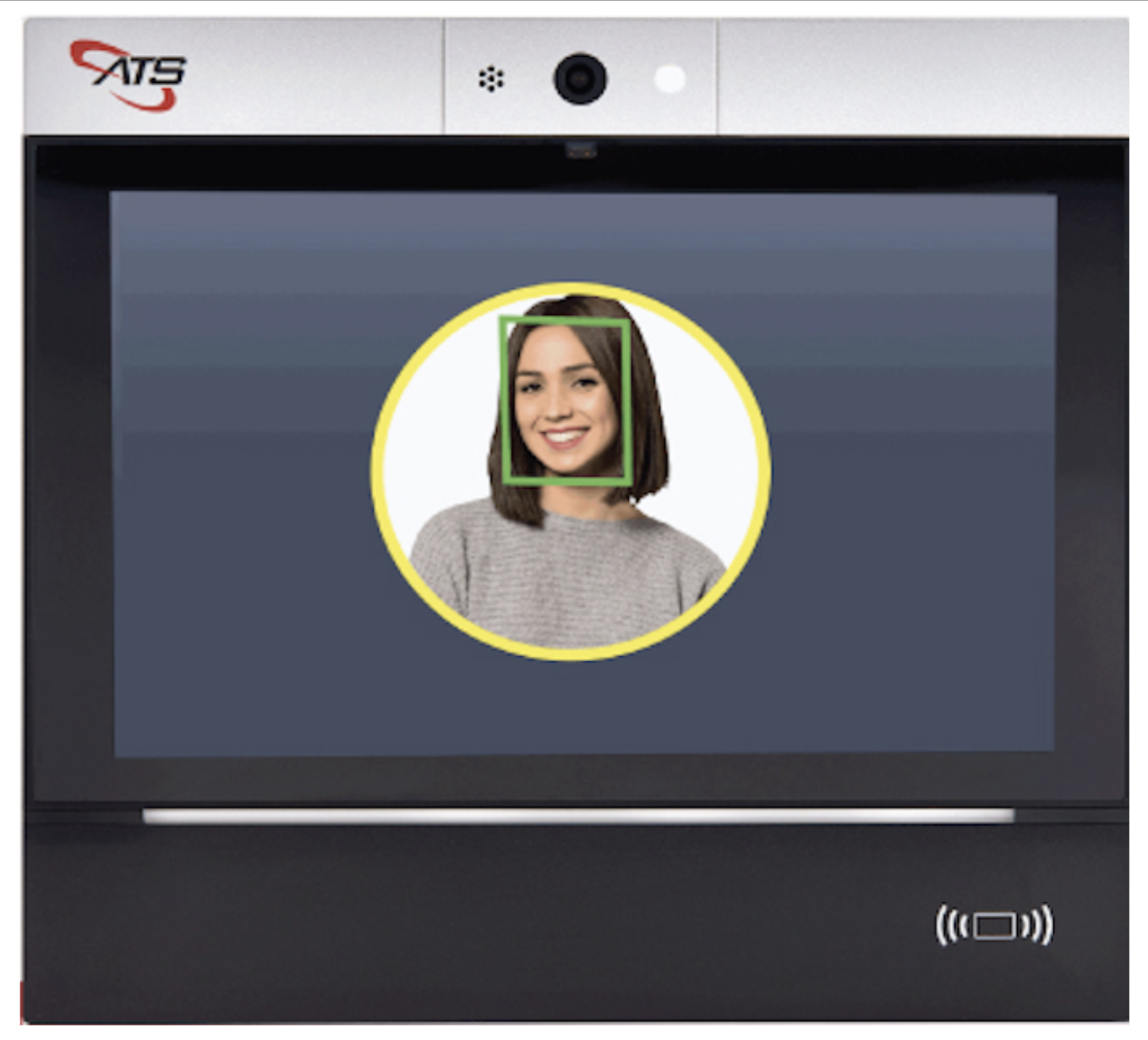
Employees who have enrolled in the biometric facial recognition process often only need to touch the time clock screen once during a subsequent time clock interaction to kick off the facial authentication process. The stride80 camera quickly captures the facial features and runs the selected verification process.
If the verification is a success, the stride80 screen displays the employee name and other information for the employee to view. If you have a simplified workflow and the scan is accurate, the punch is complete and an attendance record created.
In most cases, the employee doesn’t need to touch the time clock again. Some companies opt to have employees select the punch type (e.g. In/Out or Meal In/Out). In these cases, employees would use the touchscreen a second time.
If the information displayed is not accurate or more information is needed – say the employee needs to select a job transfer or correct the punch type displayed – the employee may be able to correct it at the time clock before the attendance record is created. The employee touches the time clock screen to make the updates.
Because this type of update or correction is rare, we designed the system to allow employees to make updates at the time clock screen because it was the best balance between reducing the risk of transmission at the time clock and ensuring your customers didn’t have to spend time and money to review payroll errors because an inaccurate attendance record was created.
Enrollment in the Facial Recognition System
Before any employee can be verified by the stride80’s FRS, they have to enroll in the biometric facial recognition program at the time clock. This is typically a one-time process and does require a few taps on screen.
FRS comes with ID Assist, a color-coded visual guide that walks employees through both the enrollment and daily authentication process.
Through the hardware and software combination of the stride80 and FRS, the risks at the time clock are reduced exponentially, both in terms of how often employees must touch the time clock and how long they spend waiting together to use it.
Additional Benefits of Face Recognition Time Tracking
Minimizing the health risks of using shared devices and reducing sick days needed by employees is a major benefit of the FRS, but not the only advantage.
Customers using the stride80 time clock with facial recognition also benefit from:
- Significantly reducing buddy punching- this version of time theft can bloat payroll.
- increasing payroll accuracy.
You also benefit from facial recognition time clocks because it allows you to offer biometrics to companies and industries that can’t use fingerprint time clocks or hand recognition readers.
Health care and the food industries are good examples. Any field where employees wear gloves or are likely to have foreign substances get on their hands as they work, interfering with the fingerprint or hand recognition.
A Closer Look at the Facial Recognition Time Clock Software
Our FRS works exclusively with our Android-based stride80 time clock. You can choose which software to use on the stride80.
- Using TimeCollect: This is our time clock time collection software, ready to integrate with our FRS. It also has built-in data privacy management that complies with existing laws regarding use of employee biometric data, such as Illinois’s Biometric Information Privacy Act. TimeCollect upgrades are delivered securely over-the-air. Our TimeCollect software also has two integration options. If you opt in to use our AccuCloud solution, that comes with a full integration and our TimeCollect software. We already have a robust middleware layer that you select to use too and save yourself the time and expense of building additional software. Alternatively, you can build your own middleware to manage the biometric templates.
- Using Your Android-based time collection software: If you have a time collection appor want to build one, you can use it on the stride80 too. The FRS comes with a complete SDK so you can integrate it with our facial recognition software and your middleware. This includes integrating our IDAssist visual user guide so your team doesn’t have to write your own employee assistance module for the time clock from scratch. Our goal with our software options and the development flexibility of the Android-based stride80 is to make it easy and lucrative for you to bring a biometric time tracking system into your product portfolio.
Our goal with our software options and the development flexibility of the Android-based stride80 is to make it easy and lucrative for you to bring a biometric time tracking system into your product portfolio.

Help Your Customers Keep Their Employees Safe and Productive
A facial recognition time clock is another tool you can offer customers to manage their absenteeism and maximize productivity, but one that does so by addressing workplace safety and employee health directly.
We’ve all learned that there are no guarantees, but there are steps – when taken consistently – that help reduce the risk of transmitting illness. Our facial recognition software is one of those steps.
You can go to market quickly with a time clock that includes facial recognition, by reselling the Facial Recognition System with TimeCollect, backed by our middleware.
You can also decide to use our SDK to build your own software and integrations. Either way, talk with us today to see how the Facial Recognition Software works and learn more about how you can make facial recognition part of your workforce systems.
Learn more about Facial Recognition Time Clocks and their uses:
- Using Facial Recognition Online
- Using Facial Identification Technology
- Use Facial Recognition for Employees
- How does an attendance machine work?
- How do Face Recognition Devices Work?
- What is an attendance monitoring system?
- How do Facial Recognition Algorithms Work?
- How do Facial Recognition Databases Work?
- How Does Facial Recognition Technology Work?
- How Facial Recognition Reduces Buddy Punching?
- Tracking Time with Facial Recognition Time Clocks
- Time Cards Used for Facial Recognition Time Clock
- Identity Detection with Facial Recognition Time Clocks
- The ROI on Facial Identification Terminals for Your Business
- How Face Recognition Can Improve Management of Time Attendance Systems?
- What is the main difference between face recognition and other biometric measures?
- Reduce Employee Buddy Punching and Time Theft With a Face Recognition Biometric Attendance